


Word Search Journey: Find Word
4.8653.00 Reviews
App Specs
- Version
- 1.2.3
- Updated On
- License
- Free
- Downloads
- 500,000+
- Developer
- Playful Bytes
- Categories
- Word
- Platform
- Android
Screenshots
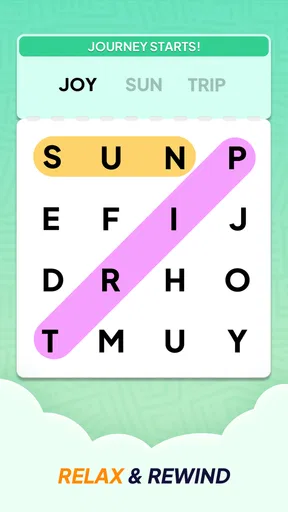
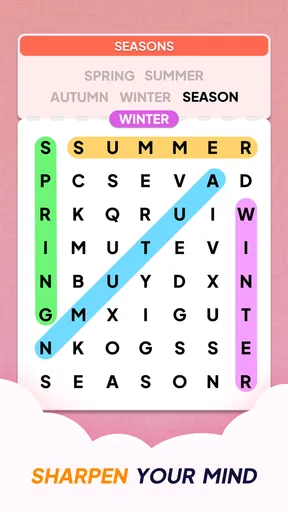
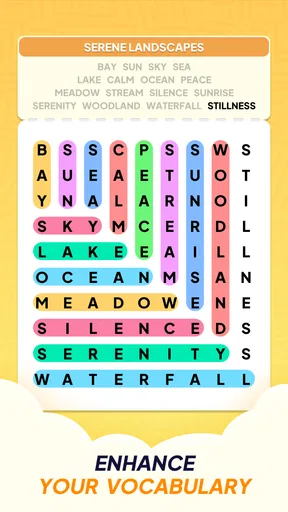
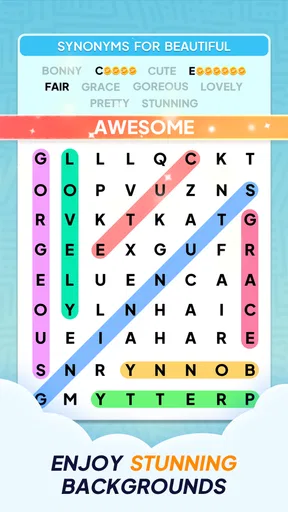



 Analysis by AppCompare
If you're anything like me, you probably find yourself drawn to games that are both fun and give your brain a little workout. Well, let me tell you about an app that does just that. It's called Word Search Journey: Find Word, and it's a delightful little puzzle game that will have you hooked in no time.
The appeal of the first few sessions
What makes a word search easy to return to is how little preparation it asks of you. You can open a puzzle during a quiet break, focus on a grid for a few minutes, and stop when you need to get on with your day. That compact rhythm suits people who want a calm activity rather than a game that demands a long session or a complicated plan.
I’d especially recommend this style of play to someone who enjoys spotting patterns but doesn’t want timers, competition, or a story to keep track of. It can also be a comfortable option for older players who prefer familiar puzzles and a straightforward goal. The game is rated Everyone, and its emphasis on word finding makes it easier to approach than many action-heavy mobile games.
A practical way to try it is to play a puzzle when you would otherwise reach for a social feed: while waiting for an appointment, during a tea break, or winding down before bed. I find that setting a natural stopping point—one puzzle or one short session—keeps the activity relaxing. The appeal is less about racing through content and more about enjoying the small satisfaction of recognizing a word in the jumble.
Getting Started with Your Word Adventure
First off, downloading Word Search Journey: Find Word is an absolute breeze. Once you've got it installed, the app greets you with a simple and clean interface. No complicated menus or overwhelming options here, just a straightforward path to diving right into the word-finding fun.
The game begins with a brief tutorial that’s intuitive enough to get even the most tech-challenged among us started. You’ll be searching for words hidden in a grid of letters, and all it takes is a swipe of your finger to select them. Easy peasy, right?
That swipe-based interaction is a useful detail if you’re choosing a puzzle game for someone who finds dense controls off-putting: the main action is visible and direct. Still, word searches do ask for steady visual attention. If small letters or long sessions are tiring, it’s sensible to play in short bursts and stop when the grid becomes more effort than relaxation.
Worth Reading Before You Choose

EA SPORTS FC Mobile 26 Is a Bigger Football Game, but It Takes Time

Flipboard Shows What News Apps Must Do Beyond the Feed

Switching to Android Auto Means Rethinking Your Driving Routine

Google Calendar Makes a Crowded Week Easier to Manage

Ludo King Makes the Most of the Minutes Between Plans

Baby Panda World Brings Quick Play to Modern Phones, but Its Game Library Feels Busy
A World of Puzzles
One of the things I absolutely adore about this app is the variety of puzzles it offers. You’re not just stuck in one place. The game takes you on a journey across different themes and settings. From nature and science to history and art, each level brings a fresh batch of words to discover. It's like taking a mini-vacation without ever leaving your couch!
Each level increases in difficulty, which keeps things challenging and exciting. You might start off finding simple three-letter words, but before you know it, you'll be hunting down nine-letter brain-busters.
Keeping the habit enjoyable
Playful Bytes made this as a word game, and the best reason to keep it installed is that it can fit into a routine without taking over one. For instance, I might use a short session as a gentle reset after work: finish a puzzle, put the phone down, and carry on. If you’re trying to build a low-pressure habit, linking play to a regular pause in your day can make it easier to remember without turning it into another obligation.
The store summary describes offline play, which matters when you want something to do on a commute or in a place with unreliable reception. I’d still make sure the game is ready before relying on it for a particular trip, rather than assuming every situation will work exactly as expected. Offline availability is most useful when treated as flexibility, not as a reason to let the game fill every idle moment.
Its scale also supports returning over time: the game advertises thousands of puzzles, so there is room to explore beyond a first handful of grids. That doesn’t automatically mean every puzzle will feel fresh forever. The familiar word-search format remains the core activity, so lasting enjoyment depends on whether you like repeating that kind of focused visual hunt.
Features That Enhance the Fun
Now, let’s talk about the delightful little features that make this game stand out. First, there’s the daily challenge. Every day, a new puzzle awaits you, offering a chance to earn extra rewards and bragging rights. Who doesn't love a little daily dose of victory?
The app also has a nifty hint system. If you ever get stuck—and trust me, it happens to the best of us—you can use a hint to reveal a letter or even a whole word. But use them wisely; they’re like precious gems in the world of word puzzles.
For a more satisfying session, I’d try scanning the grid methodically before spending a hint: check likely starting letters, then trace possible directions rather than jumping randomly between corners. That small change makes the search feel less frustrating and lets hints remain a fallback for a genuinely stubborn word. If you’re playing with someone else, taking turns scanning different parts of the grid can also make a quiet puzzle into a shared activity without changing the game’s relaxed pace.
The daily challenge can be a good anchor for a routine, but it is not a great fit if you dislike feeling prompted to check a game every day. I’d treat it as an optional extra, not a commitment. Missing a day should not turn a restful pastime into a source of guilt; the ordinary puzzles are the better choice when you simply want to play on your own schedule.
How it compares with other word games
Compared with crosswords, this is more about visual recognition than retrieving a clue’s exact answer. That makes it a gentler choice when you want to concentrate without wrestling with trivia or a tricky definition. Compared with word-building games, you aren’t trying to form words from a limited rack of letters; you’re scanning a grid for complete words. If that visual search is what you enjoy, this is a natural fit. If you want deeper language puzzles, strategy, or a competitive score chase, a crossword or word-building game may hold your attention better.
There’s also a trade-off in the simplicity. A clear, repeatable puzzle is easy to pick up, but players who need a changing mechanic or a strong narrative may find the format familiar after a while. I wouldn’t choose it as my only game if I were looking for constant surprises. I would choose it as a dependable option for calm, self-paced play.
Why You'll Love It
Aside from the addictive gameplay, this app is incredibly satisfying for word nerds like me. There’s something so fulfilling about finding that last elusive word and seeing it light up on the screen. Plus, it's educational! You’ll expand your vocabulary without even realizing it, and that's a win-win in my book.
Another thing I appreciate is that the game isn’t littered with ads every five seconds. It’s a smooth experience that lets you stay focused on the puzzles. There are in-app purchases, but they’re not necessary to enjoy the game.
The game is free to start, with optional in-app purchases ranging from $0.99 to $15.99 per item. I’d approach those as optional convenience or extras, not as a requirement for deciding whether the basic puzzle loop suits you. If you are cautious about spending, check purchase prompts carefully and avoid buying anything just because you are stuck; a pause and a fresh look at the grid may be enough.
For someone choosing a game for a parent or older relative, I’d consider whether they enjoy word searches already and are comfortable swiping on a phone. A familiar puzzle can be welcoming, but individual eyesight, hand control, and patience with touchscreens matter more than the age rating alone. It may be worth sitting together for the first session so they can learn the selection gesture and decide whether the screen feels comfortable.
What may wear thin, and who should skip it
The main source of fatigue is repetition, not a complicated system. The satisfaction of finding words can remain pleasant, but the basic task stays recognizable from one session to the next. Players who quickly tire of scanning letter grids, or who want every session to introduce a new kind of challenge, may find that novelty fades. In that case, alternating it with a crossword, a spelling game, or another genre is more likely to keep puzzle time enjoyable than forcing a daily streak.
Difficulty can also change the mood of a session. A straightforward grid is calming; a more demanding one can become slow if you’re tired or trying to play in a noisy place. I’d save the harder searching for a moment when you can give it your attention, and use shorter sessions when you’re distracted. This is not the right pick if you want a game that plays itself in the background or rewards rapid tapping.
For context, the game has a 4.8 average from around 4.7 thousand ratings, and it has passed 500 thousand installs. Those figures suggest that many players have found the word-search format appealing, though they can’t tell you whether its pace matches your own preferences. The most useful test is simple: try a few puzzles and notice whether the search leaves you refreshed or impatient.
Final Thoughts
All in all, Word Search Journey: Find Word is a fantastic app for anyone looking to unwind while giving their brain a little exercise. Whether you’re a puzzle enthusiast or just looking for a fun way to pass the time, this app is definitely worth a download.
So, go ahead, take a break from the hustle and bustle of daily life and indulge in a little word adventure. Trust me, your vocabulary—and your brain—will thank you!
My long-term verdict is that it earns space on your phone if you genuinely like word searches and want an easy, offline-friendly way to return to them. It was released on March 2, 2025, and version 1.2.3 supports Android 8.0 and up. Those practical details make it accessible to many Android users, but the deciding question is still whether you enjoy the repeated act of searching. If you do, its large puzzle selection and low-pressure format give it recurring value; if you’re looking for evolving mechanics, intense competition, or a different challenge every time, I’d pick another kind of word game instead.
Pros
- Engaging puzzles that boost vocabulary.
- Intuitive interface for easy navigation.
- Variety of levels keep it challenging.
- Offline mode available for no distraction.
- Regular updates with new content.
Cons
- Contains ads that can interrupt gameplay.
- Some levels seem repetitive.
- In-app purchases can be pricey.
- Limited hints without purchase.
- Battery consumption is slightly high.
FAQs for Word Search Journey: Find Word
What is Word Search Journey: Find Word?
Word Search Journey: Find Word is a puzzle game designed to enhance your vocabulary and cognitive skills. Players navigate through various levels, finding hidden words within a grid. Each level becomes progressively challenging, offering a fun and educational experience for users who enjoy word puzzles.
Is Word Search Journey available for both Android and iOS?
Yes, Word Search Journey: Find Word is available for both Android and iOS devices. You can download it from the Google Play Store for Android devices and the App Store for iOS devices. The game is designed to run smoothly on most smartphones and tablets.
Are there in-app purchases in Word Search Journey?
Word Search Journey offers in-app purchases that enhance the gaming experience. While the game is free to download and play, users can purchase hints or unlock additional features. These purchases are optional, allowing players to enjoy the game without spending money if they choose not to.
How does the hint system work in Word Search Journey?
The hint system in Word Search Journey provides assistance when you're stuck finding a word. Players can use hints to reveal letters or entire words, helping them progress through challenging levels. Hints can be earned through gameplay or purchased via in-app purchases, offering flexibility to players.
Is an internet connection required to play Word Search Journey?
Word Search Journey can be played offline, making it a great option for on-the-go entertainment. However, certain features like leaderboard updates and in-app purchases require an internet connection. This flexibility allows players to enjoy the game anywhere, even without access to Wi-Fi or data.


